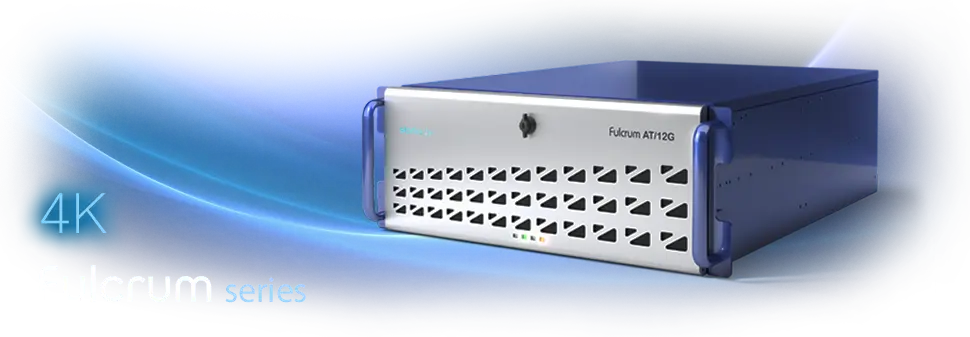
Fulcrum – affordable and reliable 3G/HD server with 4K support
Fulcrum was created as a broadcast grade entry level server for working with 4K/3G/HD resolutions and a wide range of available options.
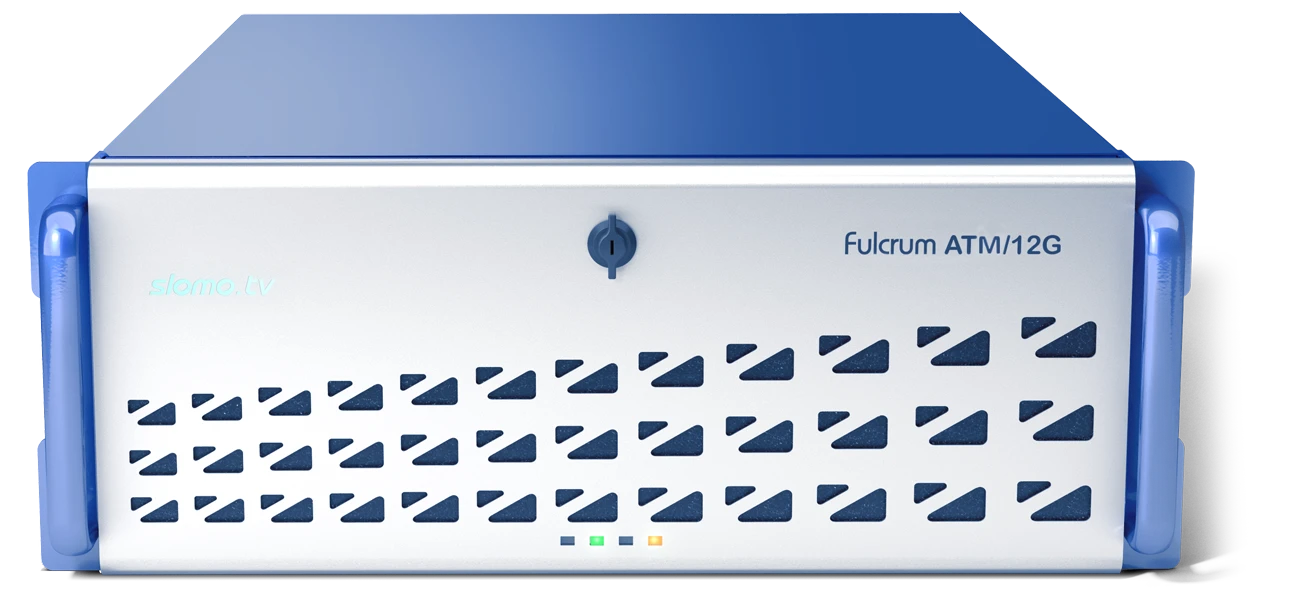
The high performance of the recording and replay system, its relatively small size and weight (4U – 56 cm, 20 kg) make the Fulcrum server convenient for integration into any studio or OB Van.
Fulcrum capabilities, which in 4K replay mode outperform most other manufacturers' solutions, can meet the needs of small companies, planning to expand their production by increasing the number of cameras or switching to 4K, as well as large-scale TV companies, which are actively working with 4K.
| Affordable Fulcrum AT/12G | Powerful Fulcrum ATM/12G |
|---|---|
| Number of bi-directional SDI Inputs / Outputs | |
| 8 SDI I/O | 12 SDI I/O |
| Slow motion replays The search and marking is done on using the Main Interface or Multiviewer, rather than a separate Playback channel with SDI output. The number of search channels always equals the number of recording channels. |
|
|
3G/HD: Up to 7 7 2 configuration (7 Rec + 7 Search + 2 Play + FX) 4K: 4 4 2 configuration (4 Rec + 4 Search + 2 Play + FX) |
3G/HD: Up to 11 11 2 configuration (11 Rec + 11 Search + 2 Play + FX) 4K: 4K: 4 4 2 configuration (4 Rec + 4 Search + 2 Play + FX) |
| Recording for NLE Recording is made to internal storage for further export or, using DMR™ technology, to removable HDDs directly in NLE native video files. |
|
|
3G/HD: Up to 8 channels with DMR™ 4K: DMR™ – 3 channels, Export – 6 channels |
3G/HD: Up to 12 channels with DMR™ 4K: DMR™ – 3 channels, Export – 6 channels |
4K support
Since 4K support is an option, it can be purchased at any time and activated remotely. 4K s/w license opens the 4 Rec + 4 Search + 2 Play + FX configuration in replay mode and up to 6 recording channels for NLE.
SSM cameras support
The affordable recording and replay servers Fulcrum are integrated with Super Slow Motion cameras from most manufacturers and support various modes – standard 2x, 3x, 4x (e.g. Panasonic AK-UC4000), Xtra Motion 6x (GVG LDX-86 HS/XS) and HyperMotion (1000FPS Ikegami HiMotion-II). The number of required SDI inputs depends on the shooting speed. For example, 3x cameras require 3 dedicated 3G SDI video inputs.
Transfer function – integration into the network environment
All SLOMO.TV servers support exchanging of video materials between locally networked servers. This allows clips from servers that work with high-speed cameras to be used by other servers for Summary/Highlights without additional hardware or software options.
The Fulcrum server is equipped with a 2-port high-speed 10GbE interface for video exchange and integration into a high-performance network environment of TV companies. In addition, 10GbE allows recording to the NAS. When using the "growing files" (MXF, XDCAM 50), files recorded on the NAS can be used for editing immediately after recording starts (if this mode is supported by the non-linear editing program).
DMR™ (Direct Movie Record) – Multi-channel recording direct in NLE native file formats with absolute material protection
The proprietary DMR™ technology – recording into native files of non-linear editing systems is a unique feature of SLOMO.TV servers. When working with the DMR™ server records video using selected codec (Apple ProRes; AVID DNxHD; DVCPro HD; DVCPro 50; IMX; XDCAM 50; AVC-Intra 100/XAVC) to a built-in SSD video array in a specially developed fail-safe high reliability file format and in native files of NLE systems on any available file storage.
Typically, recording is performed on 3.5" SATA spin drives installed in 4 specialized toolless/trayless built-in racks. Recording can also be performed to a NAS. DMR™ technology also allows recording of low resolution Proxy SD files in parallel with the recording of full size high quality video files. For 4K resolutions, up to 3 channels with the Apple ProRes 442 codec can be recorded using DMR™.
Thanks to simultaneous recording to the built-in array and to any file media, the material is duplicated. This ensures that the recorded material is kept safe. In case of file loss on NAS or 3.5" SATA spin drives, the user can export the material from the built-in array in the selected codec.
Support for "growing files"
The server supports work with "growing files" (MXF, XDCAM 50). Usually MXF "growing files" are recorded to the NAS, connected to the editing systems supporting such technology – Adobe Premiere. This allows editing of video material right after the start of the recording.
Two independent workplaces for the ATM model
The 12 SDI I/O can accommodate a 2nd optional workplace. It is possible to use the Fulcrum ATM/12G as 2 independent servers, each of which operates in 442 mode (4 Rec + 4 Search + 2 Play + FX) with PGM + PVW or in 552 mode (5 Rec + 5 Search + 2 Play) with PVW displayed on the Multiviewer. Both users can exchange clips and playlists.
Each workplace includes Control ZR console with 51 RGB backlit push buttons, Jog Shuttle and T-bar providing up to 1024 values of lever position. The replay console is connected via RS232/422, USB or Ethernet.
Demo options
Each server includes 20 demo licenses for single runs of various available options. This allows the user to test the options in a real production.
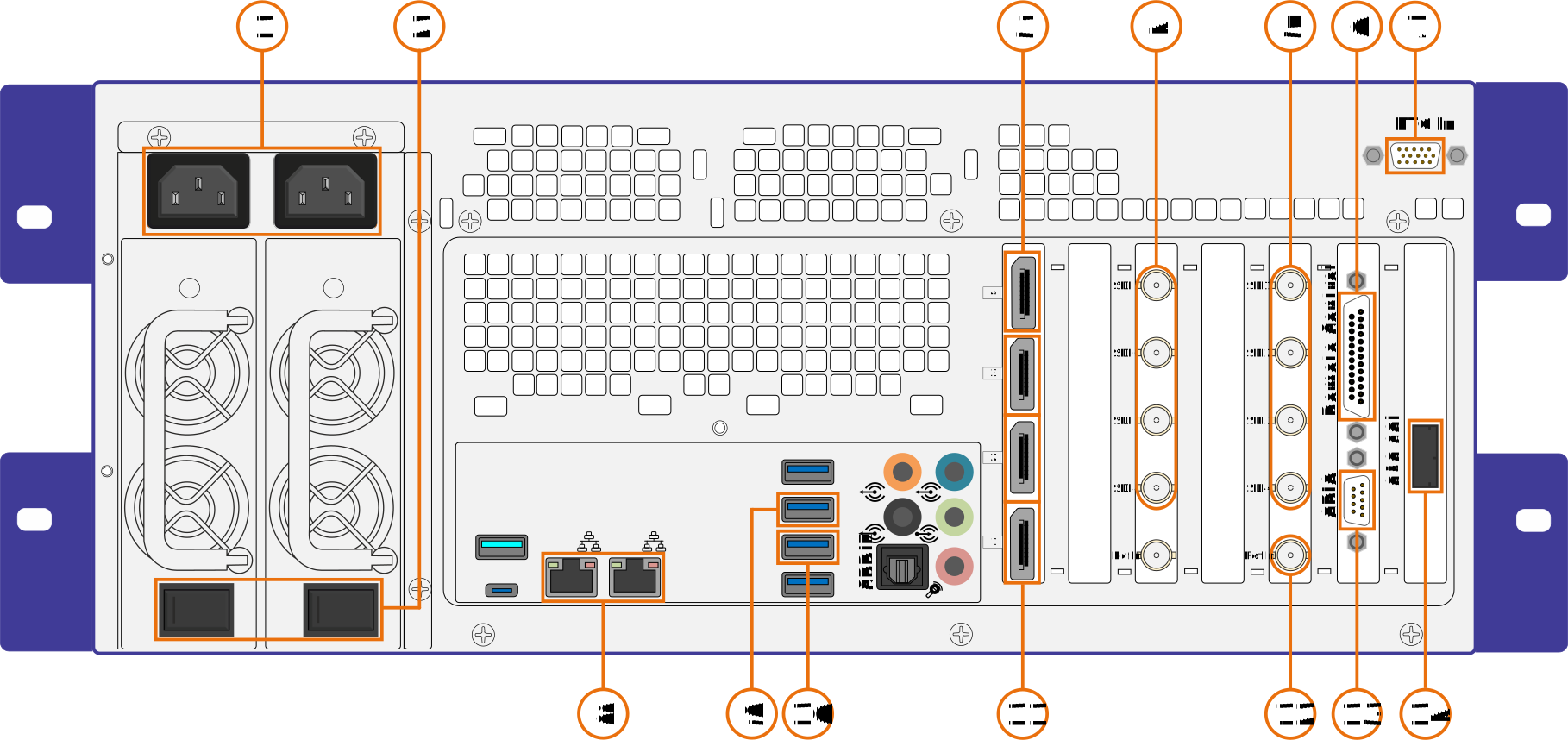
Connection diagram Fulcrum AT/12G
|
1 – Power AC 110/220V 60/50Hz; 2 – Power On/Off switches; 3 – Main Monitor – for Main Interface / Multiviewer (DisplayPort); 4 – SDI Inputs/Outputs 1...4 (BNC); 7 – SDI Inputs/Outputs 5...8 (BNC); 5 – Remote Control (DB-25); 6 – LTC In – Linear Time code Input (DHS-15); 8 – 10 GbE Network (RJ-45 Ports); |
9 – Mouse (USB Port); 10 – Keyboard (USB Port); 11 – Additional Monitor – for Multiviewer / Game Analyzer / Preview (Display Port); 12 – Ref In – Synchronization (BNC); 13 – GPIO (DB-9); 14* – SAS 6Gb. * – optional. |
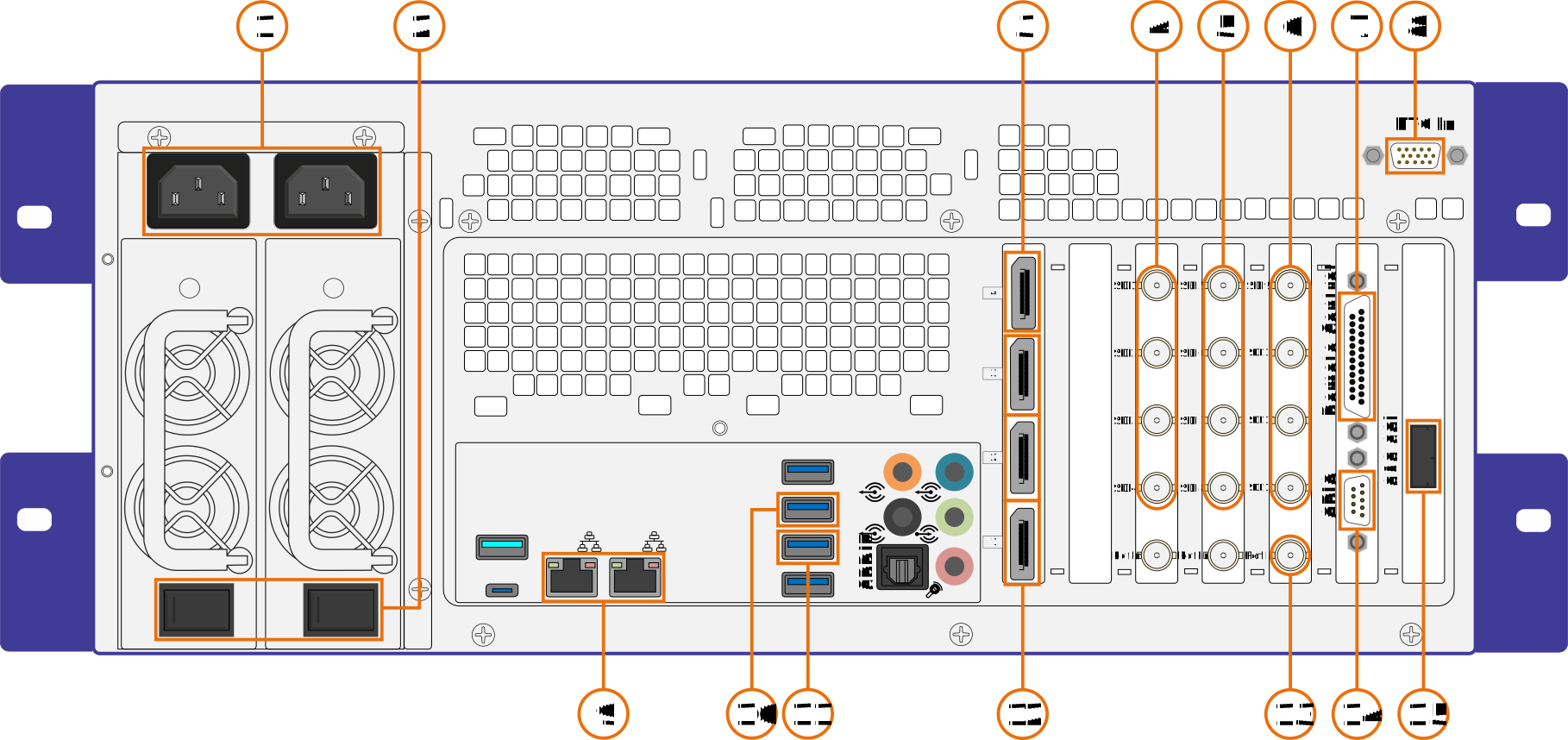
Connection diagram Fulcrum ATM/12G
|
1 – Power AC 110/220V 60/50Hz; 2 – Power On/Off switches; 3 – Main Monitor – for Main Interface / Multiviewer (DisplayPort); 4 – SDI Inputs/Outputs 1...4 (BNC); 5 – SDI Inputs/Outputs 5...8 (BNC); 6 – SDI Inputs/Outputs 9...12 (BNC); 7 – Remote Control (DB-25); 8 – LTC In – Linear Time code Input (DHS-15); |
9 – 10 GbE Network (RJ-45 Ports); 10 – Mouse (USB Port); 11 – Keyboard (USB Port); 12 – Additional Monitor – for Multiviewer / Game Analyzer / Preview (Display Port); 13 – Ref In – Synchronization (BNC); 14 – GPIO (DB-9); 15* – SAS 6Gb. * – optional. |
| Parameters | Fulcrum AT/12G | Fulcrum ATM/12G | Dominator AT/3G | Dominator AT/12G | BlackJack AT/4K | |
|---|---|---|---|---|---|---|
| Video inputs SDI (Replay Mode / Recording for NLE) | ||||||
| 12G* | 4 / 6 (DMR™ – 3 channels, export – 6 channels) | 4 / 6 (DMR™ – 3 channels, export – 6 channels) | -- | 6 / 6 | 4* / 6* (Quad 3G SDI Connection) | |
| 3G | 7 / 8 | 11 / 12 | 14 / 10 | 14 / 10 | 20 / 10 | |
| HD/1280p/SD | 7 / 8 | 11 / 12 | 14 / 16 | 14 / 16 | 20 / 24 | |
| Video outputs SDI (Replay Mode) | ||||||
| 3G/HD/1280p/SD | 2 | 2 | 2 | 2 | 4 | |
| 12G* | 2 | 2 | -- | 2 | 2 (Quad 3G SDI Connection) | |
| 1st Out – Playout with transition effects between clips. 2nd Out can be configured as Preview, Multiviewer, Alpha-channel, Game Analyzer or Delay Output*. | ||||||
| Graphic ports | 4 DP | |||||
| Video Formats | ||||||
| HD/SD SDI | 29.97Hz/59.94Hz: 1920x1080/59.94i, 1920x1080/29.97 PsF, 1280x720/59.94p, 720x480/29.97 PsF,
720x480/59.94i 25Hz/50Hz: 1920x1080/50i, 1920x1080/25 PsF, 1280x720/50p, 720x576/25 PsF, 720x576/50i Support of 16:9 and 4:3 modes. | |||||
| 3G | 1920x1080/59.94p, 1920x1080/119.88i 1920x1080/50p, 1920x1080/100i | |||||
| 4K | UHD (3840x2160) 25p/30p/50p/60p | |||||
| Operational channels (simultaneously) | ||||||
| Replay Mode | 12G SDI | 4 Record 4 Search 2 Playback +FX | 4 Record 4 Search 2 Playback +FX | -- | 6 Record 6 Search 2 Playback +FX | (Quad 3G SDI Connection): 4 Record 4 Search 2 Playback + FX |
| 3G/HD/SD SDI | Up to 7 Record 7 Search 2 Playback + FX | Up to 11 Record 11 Search 2 Playback + FX | Up to 14 Record 14 Search 2 Playback + FX | Up to 14 Record 14 Search 2 Playback + FX | Up to 20 Record 20 Search 8 Playback + FX | |
| Recording for NLE | 12G SDI | Up to 4 | Up to 4 | -- | Up to 6 | Up to 6 |
| 3G**/HD/SD SDI | Up to 8 | Up to 12 | Up to 16 | Up to 16 | Up to 24 | |
| Codecs | ||||||
| Replay | 3G / HD / SD | DCT based I-Frame; ProRes; AVID DNxHD; DVCPro HD; DVCPro 50; IMX; XDCAM 50; AVC-Intra 100/XAVC | ||||
| 12G (4K) | DCT based I-Frame 1200Mbit | |||||
| DMR™ | 3G / HD / SD | ProRes; AVID DNxHD; DVCPro HD; DVCPro 50; IMX; XDCAM 50; AVC-Intra 100/XAVC | ||||
| 4K | ProRes 422 | |||||
| Export | 3G / HD / SD | MJPEG; ProRes; AVID DNxHD; IMX; XDCAM 50; MPEG2 Long GOP; H.264; MPEG4; DVCpro 50 / DVCPro HD; AVC-Intra 100/XAVC; v.210* | ||||
| 4K | ProRes 4444, RAW UNCOMPRESSED*; 4K ProRes | |||||
| Export Containers | QuickTime / MXF / MP4 | |||||
| Storage (SSD) | 266 hrs. HD video 100 Мbit/s | 266 hrs. HD video 100 Мbit/s | 133 hrs. HD video 100 Мbit/s | 266 hrs. HD video 100 Мbit/s | 266 hrs. HD video 100 Мbit/s | |
| Multiviewer | Built-in into main interface – up to 9 video windows; For 3G/HD/SD only: Separate on second graphics or SDI output – up to 16 video-windows; As one of MultiSkin modes. | Built-in into main interface – up to 13 video windows; For 3G/HD/SD only: Separate on second graphics or SDI output – up to 24 video-windows; As one of MultiSkin modes. | Built-in into main interface – up to 16 video windows; For 3G/HD/SD only: Separate on second graphics or SDI output – up to 30 video-windows; As one of MultiSkin modes. | Built-in into main interface – up to 22 video windows; For 3G/HD/SD only: Separate on second graphics or SDI output – up to 42 video-windows; As one of MultiSkin modes. | ||
| Recorded Audio Channels *** (Replay Mode / Recording for NLE) | Up to 56/64 16/24 bit 48 kHz | Up to 88/96 16/24 bit 48 kHz | Up to 112/128 16/24 bit 48 kHz | Up to 112/128 16/24 bit 48 kHz | Up to 160/192 16/24 bit 48 kHz | |
| Replay Audio Channels | 8 audio channels embedded into SDI video output signal | |||||
| Controller | Specialized console Control ZR with push-buttons, T-Bar and Jog/Shuttle (via RS-422 / RS-232* / USB* / Ethernet* interface). | |||||
| Time-code | LTC (SMPTE 12M-1) Support of Drop Frame and Non-Drop Frame for 29.97/59.94 modes | |||||
| Synchronization | Support of BlackBurst and Tri-Level signals | |||||
| GPIO | 2 inputs and 2 outputs for integration with external equipment (Mixer, Switcher, Automation) | |||||
| Video Standards SDI | HD video – SMPTE 292M, SMPTE 274M SD video – SMPTE 259M 720p video – SMPTE 296M 2001 3G video – SMPTE 424M / SMPTE 425M 4K video – SMPTE ST-2081 / SMPTE ST-2082 | |||||
| Video Exchange | 10 GbE (Network) USB 3.0/eSATA (External HDD Box) Built-in trayless/toolless 3.5" SATA HDD Rack | |||||
| DMR™ RACK | 4 | 8 | ||||
| Independent replay workplaces | 1 | 1+1* | 1+1* | 1+1* | 1+3* | |
| Power | 110V/60Hz or 220V/50Hz | |||||
| Power Consumption | 500 W | |||||
| Chassis | 4U, 19" | |||||
| Dimensions (H x W x D) mm | 176.5 х 483 х 560 (with redundant PS) | |||||
| Weight Kg | 20 | |||||
|
Notes: * – optional. ** – depends on the codec used. *** – embeded. |
||||||
| Options | Description | Fulcrum AT/12G | Fulcrum ATM/12G | Dominator AT/3G | Dominator AT/12G | BlackJack AT/4K |
|---|---|---|---|---|---|---|
| Transfer | Ability to transfer any clip or playlist to network integrated servers with the same option. | Included | Included | Included | Included | Included |
| Game Analyzer | Telestrator for imposition of graphical elements (line, arrow, curved arrow, circle, etc.) and free hand
drawing on live video. Best with Wacom Cintiq tablet (not included) |
Included | Included | Included | Included | Included |
| DMR™ (Direct Movie Record) | Multi-Channel Recording direct in NLE native file formats (DVCPro HD codec) |
Included | Included | Included | Included | Included |
| Support of 4K | Allows working with 4K video in Replay and Recording mode | ✔ 4Rec + 4Search + 2Play + FX |
✔ 4Rec + 4Search + 2Play + FX |
✖ | ✔ 6Rec + 6Search + 2Play + FX |
✔ 4Rec + 4Search + 2Play + FX |
| Multipack codecs | Supports of codecs: Apple ProRes; AVID DNxHD™; XDCAM422 50Mbit; AVC-Intra 100; XAVC; AVC-Intra 50. | ✔ | ✔ | ✔ | ✔ | ✔ |
| XAVC 4K hardware codec | Supports: AVC-Intra 100; XAVC; AVC-Intra 50 for all resolutions(4K/HD/SD) | ✔ | ✔ | ✔ | ✔ | ✖ |
| Additional Replay Workplaces | Additional operator's workplace for 3G/HD mode. Includes the remote controller. | ✖ | ✔ 1 |
✔ 1 |
✔ 1 |
✔ Up to 3 |
| SSD Storage Expansion* | Built-in storage expansion to 532 hrs. of 100 Mbit HD video. | ✔ | ✔ | ✔ | ✔ | ✔ |
| Fibre Channel* | Hardware option for connection to FC RAID/SAN. Provides high speed (16Gbit) reliable integration with external file storage. Available for any Level 16G SAN compatible system. | ✔ | ✔ | ✔ | ✔ | ✔ |
| Super Motion | Support for 2x, 3x, 4x Super Slow Motion HD Camera. | ✔ | ✔ | ✔ | ✔ | ✔ |
| Xtra Motion | Support for 6x GVG LDX-86 HS/XS and Panasonic AK-HC5000 GVG 4X (200P) cameras. | ✔ | ✔ | ✔ | ✔ | ✔ |
| HyperMotion | Support for 1000FPS Ikegami HiMotion-II camera (Requires from 1 to 3 dedicated SDI inputs). Includes Special HiMotion-II camera Remote cable. | ✔ | ✔ | ✔ | ✔ | ✔ |
| Export | MXF/QT Export of recorded material in native Apple Final Cut and Avid MC files with DVCPro / ProRes / AVID DNxHD™/ XDCAM422 50Mbit / AVC-Intra 100 / XAVC / AVC-Intra 50 codecs. | ✔ | ✔ | ✔ | ✔ | ✔ |
| VideoServer | Fixed time delay (~3-25 sec.) of Program/Out used in Live Broadcasts. | ✔ | ✔ | ✔ | ✔ | ✔ |
| ACADEMY 8 | Software option for servers with up to 8 HD/SD recording channels. Creates a video control room simulator by providing emulation of multiple synchronized inputs. Used for individual and team training of operators and directors. | ✔ | ✔ | ✔ | ✔ | ✔ |
| ACADEMY 16 | Software option for creating a video control room simulator for individual and team training of operators and directors. Supports 2 servers with emulation of up to 16 "live" cameras in HD and SD resolution. Includes support of specialized control console. | ✖ | ✖ | ✔ | ✔ | ✔ |
| CARRYING CASE | Protective carrying case. Assures convenient, easy handling of all system components. | ✔ | ✔ | ✔ | ✔ | ✔ |
| External equipment | ||||||
| DMR™ Station 8 | External hot-swappable toolless/trayless 8-bay rack for standard 3.5" SATA hard drives suitable for DMR™ recording. Includes PCI-Ex8 Adapter and 2 meter connection cable. Transfer speed: up to 1 Gbytes/sec | ✔ | ✔ | ✔ | ✔ | ✔ |
| DMR™ Station 12 | External hot-swappable toolless/trayless 12-bay rack for standard 3.5" SATA hard drives suitable for DMR™ recording (video recording direct into native NLE file formats). Includes PCI-Ex8 Adapter and 2 meter connection cable. Transfer speed: up to 1.5 Gbytes/sec | ✔ | ✔ | ✔ | ✔ | ✔ |
|
Note: * – Available at ordering |
||||||


Distinctive features
Replay mode
User-friendly high-performance interface
Thanks to the world's fastest and most productive system interface replay operators can work single-handedly with 12-15 channels on a single server, having time not only to prepare replays, but also to make Summary/Highlights. This is in high demand in eSports competitions Dota 2, Counter Strike and others.
Simultaneous search on all channels
Due to the unique ideology and architecture of the systems, the search is not carried out on a separate SDI output, but on all channels simultaneously in the main GUI or Multiviewer. This allows the operator without unnecessary operations switch attention from one channel to another controlling all channels, which saves a huge amount of time.
Automatic playlist creation during Instant Replays
In Instant Replay mode, the system automatically creates playlists from clips that were aired. This makes it possible to faster create Highlights/Summary.
Fast creation of clips
When marking and creating clips, the SLOMO.TV system requires 1-3 less operations than other systems.
Working with 2 separate playlists
SLOMO.TV servers are able to save created clips to 2 separate playlists. This allows the operator to increase work speed, as there is no need to upload another playlist every time you want to save clips into it.
Unlimited number of clips
SLOMO.TV systems have no limit on the number of clips that can be created.
Working with playlists
Simple and intuitive interface for creating and editing playlists provides the ability to change position of clips, copy and delete them without calling up additional functions. It is also possible to add clips to playlist while playing.
Working with "hot keys"
The hot keys allow quick access to hundreds of objects – clips or playlists. Pressing 2-3 buttons provide access to any of these "quick" objects.
Export and import of clips and playlists
The software allows exporting playlists and clips without the external equipment. Import is made with standard codecs from any file media or via network. Clips and playlists created while working in Instant replay mode can be exported as one file or as clip files with markups. This is useful when working at multi-day events: at the end of each day clips and playlists are exported and later loaded into one project for Summary creation.
Networking
The Transfer function included in all SLOMO.TV servers provides exchanging of clips and playlists between servers on a local network. This allows scaling Production by using clips from servers working with high-speed cameras to create Summary/Highlights without additional hardware or software. It is possible to set up automatic transfer of all created clips and playlists to the designated server.
SSM cameras support
The Fulcrum servers are integrated with Super Slow Motion cameras from most manufacturers, providing support for 2x, 3x, 4x (e.g. Panasonic AK-UC4000), Xtra Motion 6x (GVG LDX-86 HS/XS) and HyperMotion (1000FPS Ikegami HiMotion-II) cameras. The number of required SDI inputs depends on the camera shooting speed. For example, 3 dedicated 3G SDI video inputs are required for a 3x camera.
SSD-based subsystem
Together with several manufacturers of SSDs SLOMO.TV developed technology for avoiding degradation and loss of performance in recording to solid state drives. We became pioneers in creating servers with an SSD-based video array. The use of SSD makes systems more robust, especially when searching on all channels simultaneousely. It also reduces the weight of the server and makes it more reliable when working in harsh conditions like heavy vibration.
Built-in and a dedicated Multiviewer
The presence of a built-in Multiviewer in the main interface allows the operator to keep an eye on all channels. All indicators, controls and video windows, including search channels, are always before the operator's eyes. The dedicated Multiviewer is connected via HDMI and has up to 5 different sets of video windows to choose from.
4 graphics ports
Availability of 4 graphics ports allows connecting up to 4 monitors, which can be used to display the Main Interface, Multiviewer, as well as Game Analyzer (Telestrator). When two operators work with one server (2 independent workplaces) each can use 2 monitors, for displaying the Main Interface and Multiviewer. As a rule, Multiviewer is used to work in the Instant replay mode, and the Main Interface is used when working with clips and playlists. It is recommended to use vertical arrangement of monitors.
MultiSkin function
This feature allows the operator to use one monitor to display different interfaces: Main Interface or Multiviewer or Game Analyzer (Telestrator). This function is especially in demand in compact vehicles.
Game Analyzer (Telestrator)
All servers have support for the Telestrator to impose graphic elements (lines, arrows, curved arrows, circles, etc.) and free drawing on video. The large number of graphics ports allows using the Telestrator on a separate HDMI™ monitor with built-in "pen" interface. If no such monitor is available, you can use a standard monitor and mouse.
Alpha-channel
When configured with 2 physical video outputs, the system can play back Alpha clips that are imported into the system as a sequence of multiple files. This makes it possible to use graphic compositions and clips in forming "entrances" and "exits".
Protection of recorded material
Our highly reliable video recording format allows protecting the material in case of unexpected situations, such as power loss. All clips and playlists created by the operator are restored at restart.
Control ZR replay console
Control ZR is a fully dedicated remote control integrated with the SLOMO.TV server interface. It is designed for maximum speed and efficiency. The unique advantage of this control panel is direct access to 24 cameras in replay mode. This is an undeniable advantage when working at eSports competitions. Controller has 51 RGB backlit buttons with light and color indication providing hints for the operator. The T-Bar provides over 1000 values of lever position. The console can be equipped with Sony Jog/Shuttle with electromagnetic brake or the Jog/Shuttle by SLOMO.TV. The Jog wheel design uses 4 sliding bearings to provide smooth and free rotation for up to 40 seconds. The Shuttle wheel has 64 left and right positions, which allows you to control not only the search speed, but also the playback speed with an accuracy of up to 2%. Controller can be connected via RS232/422, USB and Ethernet. It is powered by PoE, as well as by USB (reduces the brightness of the buttons).
Two workplaces
Using 2 independent workplaces the SLOMO.TV powerful 4U servers significantly outperform other manufacturers' solutions in the number of channels. The Fulcrum ATM/12G server allows each of the 2 operators to work in the 552 mode (5 Rec + 5 Search + 2 Play + FX) with 3G/HD signals, and the Dominator AT/12G server opens the 7 Rec + 7 Search + 2 Play + FX configuration for each workplace. Because the search channels are displayed in the main interface and Multiviewer, there is no need to use a separate SDI output.
Recording for NLE
DMR™ recording for non-linear editing
The proprietary DMR™ technology provides direct recording into native files of non-linear editing systems. When working with the DMR™ the server records video to a built-in SSD video array in a specially developed fail-safe high reliability file format and, using selected codec, in native files of NLE system on any available media – 3.5" SATA spin drives installed in racks in the server’s front panel or NAS. Supported codecs are: Apple ProRes; AVID DNxHD; DVCPro HD; DVCPro 50; IMX; XDCAM 50; AVC-Intra 100/XAVC. Thanks to the parallel recording to the built-in array and to file media, the material is duplicated. In case of loss of material on NAS or 3.5" SATA spin drives, the user can export recorded materials from the built-in array.
In contrast to the vast majority of other solutions SLOMO.TV servers in recording for editing are self-sufficient and do not require additional equipment (XFile, IPDirector). Using affordable 3.5" SATA disk drives as file storage can significantly reduce production costs.
SD Proxy files
DMR™ technology provides simultaneous recording of both full resolution video files and SD Proxy files, what significantly increases the speed and comfort of editing.
Built-in DMR™ Racks
The server has a Toolless/Trayless racks for cost-effective 3.5" SATA HDD. The Racks are installed on the front panel. HDDs can be hot-swapped.
Support for "growing files"
The server supports work with "growing files" (MXF, XDCAM 50). Usually MXF "growing files" are recorded to the NAS, connected to the editing systems supporting such technology – Adobe Premiere. This allows editing of video material right after the start of the recording.
10 GbE network interfaces
As all AT (Advanced Technology) servers, Fulcrum has 2-port 10GbE interface. The speed of video and data exchange is 10 times higher than that of standard servers and amounts to 1 gigabyte per second. In addition, the presence of 10GbE makes it possible to record video files on NAS, to be used without delay for real-time video editing.
Additional features
Video-refereeing
As a pioneer and developer of video-refereeing systems for various sports, SLOMO.TV makes it possible, to use the server as a video-refereeing system with 8-12 cameras. The videoReferee® option allows viewing of controversial moments up to 4 cameras simultaneously, frame-by-frame analyzing or playback with adjustable speed.
eSports Support
The servers support a large number of 3G channels, which is one of the key requirements for the broadcast of eSports.
Redundant power supply
All Fulcrum servers are equipped with a redundant power supply as standard.
VideoServer – Delayed Out
This function allows setting a constant delay for Program/Out. This feature is actively used in live broadcasting and reality shows for monitoring and operative editing.